Underline Text Generator – (c̲o̲p̲y̲ a̲n̲d̲ p̲a̲s̲t̲e̲)
Underlining text looks simple, but many word processors and social media platforms don’t have this feature. Users commonly struggle when attempting to post something on social networks, chats, or usernames without access to formatting tools. There is a key challenge for finding such ways that underlined text can be made, copied and pasted anywhere.
This free Underline Text Generator is created to handle this specific problem. It changes ordinary text to underlined Unicode characters that can be used practically anywhere. By applying this tool, the emphasis is on simplicity, compatibility, and rapid results.
Text is often underlined for prominence, clarity, and visual organization. Users can make their text underlined using browser. They don’t need any editor or special fonts etc in system.
What is an Underline Text Generator?
An underline text generator is an online tool that creates underlined text using Unicode characters. Instead of standard formatting, it places underlines beneath characters or uses concatenated Unicode characters. It guarantees that users can copy the results and paste these anywhere.
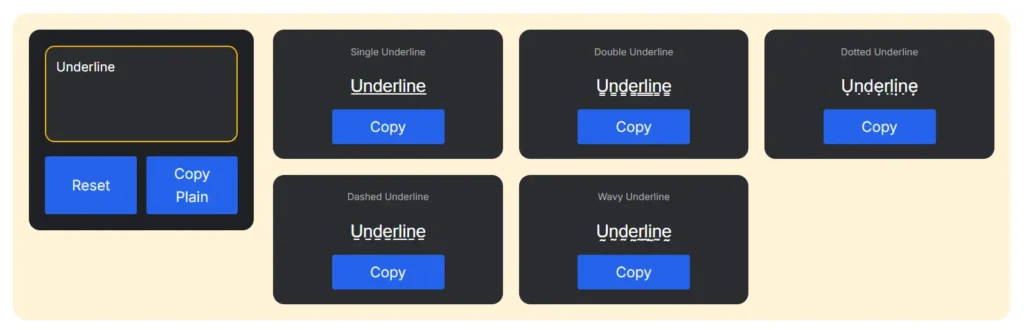
How Underlined Text is Created?
The tool checks each character you type, and adds an underline mark or symbol. These symbols are part of Unicode and are recognized by many current applications. The result is visually emphasized while remaining plain text.
Unicode-Based Underlining
Because Unicode is text-based, underlined output works differently from stylized fonts. It can be copied, pasted, and reused on compatible systems. This allows for greater flexibility than editor-only formatting.
Types of Underline Text Styles
Underlined text is not limited to a single style. Different underline formats are used depending on visual needs.
Simple Underline Text
Simple underlining places a straight line beneath each character. It is the most common and readable style. It works well for emphasis in plain text environments.
Bold and Double Underline Variants
Some generators offer bold underlining or double underlining. These styles add stronger emphasis. They are useful for highlighting keywords or headings.
Symbol-Based Underlining
Symbol-based underlining uses underscore or line characters. While not always perfectly aligned, it remains widely supported. This method is often used in basic text fields.
Where Underline Text Is Commonly Used
Underlined text appears across many digital platforms. Its purpose is usually to emphasize or structure.
Social Media and Messaging Apps
Users apply underlined text in posts, captions, and messages to highlight important words. Since many platforms don’t support native underlining, Unicode-based solutions are popular. It makes underline generators especially useful.
Usernames and Profiles
Underline text generator can help usernames stand out. It adds subtle styling without being overly decorative. This approach works well in profiles and bios.
Combining with Other Text Styles
Underlined text is sometimes mixed with other effects for creative layouts. For example, pairing it with an Upside Down Text Generator can create playful contrast. Others combine it with a Small Caps Generator to balance emphasis and readability.
Why Use an Online Underline Text Tool?
Online tools focus on convenience. They remove the need for formatting editors.
Copy and Paste Friendly
Generated underline text can be copied instantly. It can then be pasted into supported platforms without losing the underlying effect. This tool saves time and effort.
No Software or Fonts Required
The tool works entirely in a browser. Users don’t need to install fonts or apps. This makes it accessible on any device.
Works Across Devices
Unicode underline characters are supported on most modern systems. While appearance may vary slightly, the underlying effect remains visible. This ensures broad usability.
Underline Text vs Traditional Formatting
Underline generators differ from editor-based formatting. Understanding the difference helps set expectations.
Text-Based vs Style-Based
Traditional underlining is a style applied by software. Unicode underlining becomes part of the text itself. This allows it to travel across platforms.
Platform Limitations
Some platforms may not render underline marks perfectly. Spacing or alignment can vary. However, the text usually stays readable.
When to Use Each Method
Unicode underline text is best for copy-and-paste use. Editor formatting is better for documents with full styling control. Each has its place.
Accuracy and Limitations
Underline generators rely on Unicode support. This comes with some constraints.
Character Support
Most letters work well with underline marks. Certain symbols or emojis may not underline cleanly. The tool prioritizes compatibility.
Visual Consistency
Different fonts render underline marks differently. This can slightly affect appearance. The core effect remains intact.
Frequently Asked Questions
What is an underline text generator used for?
It is used to create underlined text that can be copied and pasted into social media, chats, and profiles.
Does underlined text work on all platforms?
Most modern platforms support Unicode underlining, but the appearance may vary slightly.
Can underlined text be copied and pasted?
Yes, the generated output is plain text and can be reused easily.
Is underline text the same as bold text?
No, underline adds emphasis by placing a line beneath the text, while bold increases the thickness.
Is underline text generator safe to use?
Yes, it contains no scripts or files and is purely text-based.